
Scam eMails Not Slowing Down
As most of you are already aware, scam eMail is still a problem plaguing our inbox. Depending on the way you receive your eMail, controlling what you see in your eMail’s inbox may vary.
There are many ways to protect yourself from a scam attack such as rules, block sender lists, spam, and junk filters. Relying on these tools are a big help but unfortunately not always full proof. One of the more effective ways is simply to read closely to its content and look for clues.
In this article, I will illustrate how to identify scam eMails. Identifying fraudulent emails from legitimate messages is a valuable skill that can save a significant amount of time when managing large volumes of electronic mail in your inbox.
Even with text messaging becoming more popular, eMail is becoming harder and harder to ignore with its many advantages. eMail still has its relevance for transporting important documents and personal messages that can’t be done any other way.
How to Identify a Phishing eMail
One way to identify a phishing eMail starts with the person or organization sending it to you. If the full eMail address does not look acceptable let your instincts take over. Do you know this person or organization and is the eMail address familiar? Does the eMail address originate from one of the social eMail providers such as Google, Microsoft, Yahoo, or AOL? Could it be from a business, bank, or a store you patronize? If the answer is no or you’re unsure consider it a scam.
Example 1
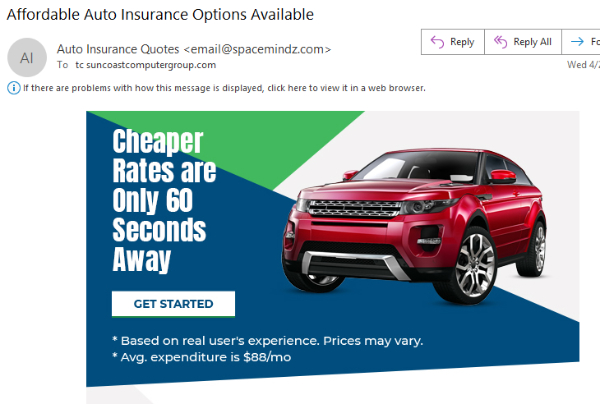
As you can see in example 1, it looks like a typical eMail for auto insurance, or is it?
Example 2
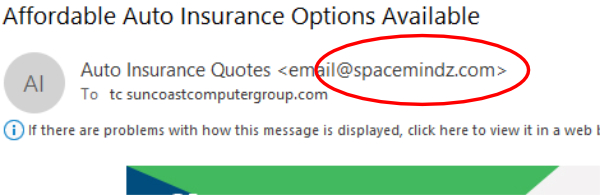
In example 2, the information after the @ symbol is a fake and dangerous domain name.
Using example 2 above, I had research “spacemindz.com” only to discovered that when going to the website it was completely blank. I was fortunate not to be infected by this site or had private information taken from my browser. This blank site could have easily transferred a virus or malware to my computer simply by visiting it.
Looking Official
One example of a phishing eMail is virus protection’s subscription extensions. Virus protection is something we all should have when using a Windows machine or possibly an Android device. Look at the virus protection you have and is it the same software you currently are paying for or not paying for? Also, an excessive fee would be another good indicator of a scam.
If you’re still not sure whether a questionable eMail has just landed in your inbox, the next thing to look for is the content of the eMail. Pay close attention to the message or the formalities that are being presented and are they relevant to you. The eMail could refer to a subscription that has expired and has been renewed making use of auto pay implying you currently have this protection on one of your devices.
In example 3 below there are lots of clues to help you with the decision to delete and forget this eMail. First would be the grammar used. In the example the end of the sentence is difficult to understand “renewed for the year Four Year.” Second, would be the helpdesk number. Most if not all scam eMails want you to call. Third, is the inconsistencies in the eMail such as Membership ID, Client UID, or is it Customer ID, which is it?
Example 3
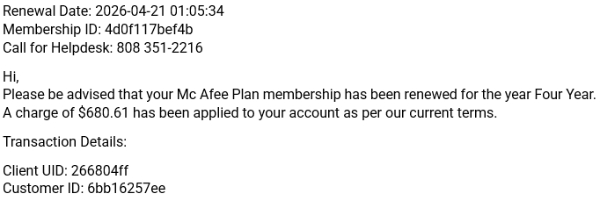
Example 3, determine if you use McAfee protection and the fee $680.61, a little expensive for 1 computer.
Don't Call
This leads me to one of the more interesting clues to a phishing eMail and that is if the sender requests you to “call.” The eMail may state that if this charge is not recognizable to you, call immediately or you may have some issues or something to the effect.
There are many reasons why the hackers want you to call. When you make a connection with them, the bad guys now know they have a working, legitimate phone number. Hackers can use this good number to work on future attacks or a continuation of attacks on the current phishing scams in your inbox.
When You Make the Call
When you make an attempt to call the bad guys, they will no doubt be very sympathetic to your problem. They want to help and at the same time find every reason possible to keep you on the phone talking. This is when the magic happens for the fraudsters.
They will start with questions that are nonthreatening to you in order to gain confidence and neutralize the situation. As time passes and it appears that the individual on the other end of the call is solving your problem, questions are being derived to get specific answers from you to further create a profile about you and your life. Remember, they are not your friend, they are trying to steal from you!
In Example 4
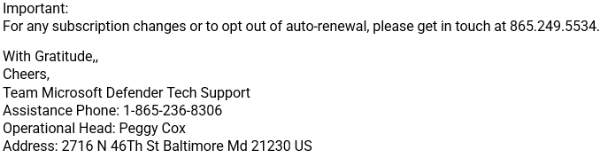
In example 4 you can see a phone number has been supplied.
Once they have gained your confidence using professionalism and empathy, this is where they will cleverly ask you if they can remotely access your computer. Their excuse will be to make sure that the service and in this case the virus protection is not on your machine. Once on your computer they will have the ability to transfer any and all data to some distant server for analysis.
Conclusion
I can go on and on with many more examples of what can be said and done to allow these clever hackers to access your computer and eventually your life. I also understand many of us may not pay close attention to the eMails that end up in our inbox. But consider that 1 click or phone call could lead to problems that may take longer to resolve than to look closely for those clues hidden in plain sight.
If you wish to comment pertaining to “Scam eMails Not Slowing Down”, please click the link below.
Have you had the misfortune of being hacked? Feel free to tell me your stories. I always appreciate becoming more educated. I will be able to educate others on how to protect themselves before falling in the traps laid out by the cybercriminals.
Tom "TC" Czajczynski